
Find conflicts before the field does.
Primepoint reviews drawings and specs before buyout for discrepancies and cross-discipline conflicts, each linked to its source and ready to send as an RFI.
Your team reviews a list of conflicts instead of hunting for them.
Primepoint does a first pass across every sheet and spec section. Each conflict, including clashes across discipline sets, is spelled out with both sources, and RFI Assistant has a draft ready to send to Procore or Autodesk when you need one.
Conflicts, with both sources
Specs against drawings, general notes against the drawing they sit on, architectural against structural. Each conflict shows the spec paragraph and the drawing detail side by side.
Pinned to the sheets involved
Every conflict sits on the sheets it involves, with a status and a ball in court: open, forward to design team, forward to sub, resolved pending revision, closed, or not an issue.
An RFI ready to draft
One click drafts an RFI that cites both documents. Your team reviews it before it goes anywhere.
Our constructability log was a lot larger than it would have been without it. So we found value right out of the gate.
 Zach HuntSenior Project Engineer, Fortis Construction

One review. Three kinds of checks.
Constructability review is an automated review of your drawings against your specs and across disciplines. Every review runs a standard set of drawing checks, any custom checks built with your team, and a search for clashes across disciplines, all in one findings log linked to its sources.
Constructability review
One findings log. Every finding sourced and ready to send as an RFI.Standard drawing checks
A series of automated checks, each built for one kind of coordination error. They compare what one discipline draws against another and against the schedules: door ratings, panel schedules, fire alarm, and duct sizes.
Clashes across disciplines
Finds where two disciplines' sheets disagree at the same spot, like a slab opening on one sheet with no match on another. Each clash is reviewed before you see it.
Custom checks
We work with your team to build checks for your company's standards and the errors that keep costing you, and they run alongside the standard set.
Built for the work before buyout
Every finding, on the sheet
Open a conflict and the drawing is already zoomed to the detail in question, with the issue panel beside it. Comment, assign it, or change its status without leaving the sheet.
- Platform
- Comments and ball in court for each conflict
- Export the log as a spreadsheet
“You know, it's not AI slop. You're able to go through and justify the answer before you pass it on to the next step.”
Zach HuntSenior Project Engineer, Fortis Construction
Where teams use it
Precon teams run it between 50% DDs and the GMP set, and project teams bring the log into design review meetings with the issues already found and documented.
- Preconstruction, before buyout
- Design review meetings
- Building the project's constructability log
“Any kind of [complicated] renovation or [adaptive] reuse jobs are great because the constructability review helps us set that job up for success.”
 Dana ErdmanVP of Technology & Innovation, Bulley & Andrews

I know my drawings really well, but even I might only know 5 out of the 7 places to look. Primepoint knows all 7 places.
 Brody SlaugenhoupEnterprise Project Engineer, Sundt Construction

Every sheet, checked against the specs, the notes, and the other disciplines.
A conflict is two documents that disagree about the same thing. Primepoint first finds the pairs that talk about the same element, then checks whether they actually disagree, then reviews each finding again to weed out false alarms before it reaches your team.
LINKED ON EVERY PROJECT
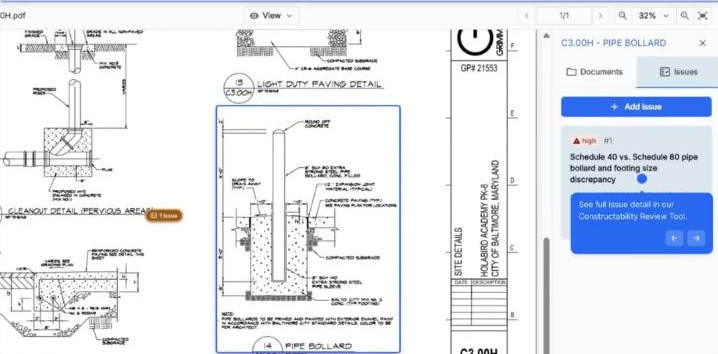
Does the bollard detail match the metals spec?
No. Detail 14 on C3.00H calls for 6" Schedule 80 extra-strong steel pipe, but spec 05 50 00 §2.15 calls for Schedule 40 black steel pipe. Flagged as a high-severity conflict.
How it works
The set syncs in
Drawings and the project manual come in from Procore or Autodesk Forma, or you upload them. Nobody splits PDFs or tags sheets.
Primepoint reads every sheet
Spec sections against the drawings, notes against the details they govern, and one discipline against another, through the knowledge graph. Drawing checks compare each discipline with the schedules.
Your team reviews
Set the status and ball in court, ask Marvin about any conflict, or draft the RFI. This can be run multiple times as the plans progress.
Questions
What does constructability review check?
It compares spec sections against the drawings, general notes against the details they govern, and one discipline against another, then lists every place two documents disagree about the same element. Every review also runs a standard set of drawing checks, any custom checks built with your team, and a search for clashes across disciplines.
What are drawing checks?
About 97 automated checks, each built for one kind of coordination error. They compare what one discipline draws against another and against the schedules, such as door ratings, panel schedules, fire alarm, and duct sizes.
How does it find clashes across disciplines?
It compares the disciplines' sheets at the same locations and flags where they disagree, like a slab opening on one sheet with no match on another. Each clash is reviewed before you see it.
Can I turn a conflict into an RFI?
Yes. Each conflict has an RFI ready to draft that cites both documents, so your PE starts from a complete draft instead of a blank form.
What is a requirements check?
Choose a document, like a contract or a spec section, and Primepoint turns it into a checklist of everything it requires, with each item linked to the paragraph it came from.
What happens when a new revision is issued?
Primepoint checks the new set against the open conflicts and shows which ones the revision cleared.
Explore more of the platform
Connected Documents
Every callout, tag, and schedule row linked to its source.
Learn moreMarvin
Your project assistant, with every source one click away.
Learn moreRFI Assistant
Answers from the drawings, drafts with every source cited.
Learn moreAuto Overlay
Compare multiple sheets across disciplines to identify discrepancies instantly.
Learn more