
Submittals don't have to slow down your project.
Primepoint checks every product in a submittal against the governing spec sections and drawing schedules, so you can submit confidently and stay on schedule.
Your PE gets a first pass review in seconds, not days, and starts with compliance gaps.
Every product in the package
Primepoint reads the product data and cut sheets and lists each product the package covers, by manufacturer and model.
Every requirement, checked
For each product, the requirements from its spec section and the schedules on the drawings: conforms, does not conform, or insufficient info. Where they differ, the required and submitted values sit side by side.
A recommendation, sources cited
A recommendation for each product, with every source one click away. Your PE checks it, signs off, and exports the review as a PDF or CSV.
What gets easier
Automatic first pass
Reviews start as submittals arrive from trade partners. Primepoint connects directly to Autodesk Forma and Procore and pulls submittals in as they arrive, without disrupting your workflow.
- Platform
- Results returned as a marked-up PDF
- Every requirement linked to its spec paragraph or schedule row
- Revised submittals compared against the last version
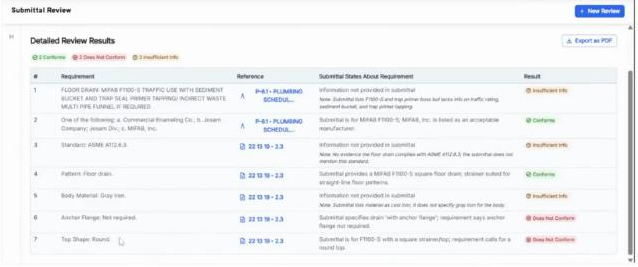
Recorded in Primepoint: an F1100-S floor drain checked against spec 22 13 19.
Submittal register
Generate your register from the project spec book and use Marvin to conform the register to your standards.
- Built from the spec book
- Customize as needed
- Tracked from day one
Submittal register · generated from the spec book
Sample register
Every submittal, read across the whole job.
A product connects to its spec section, its row in the schedule on the drawings, and the sheets it shows up on. Primepoint follows those links before it makes a call.
LINKED ON EVERY PROJECT
Does the door hardware submittal match the schedule?
One item needs review: the finish on door 150OD. Spec 08 71 00 §2.7 governs.
How it works
The package comes in
Upload the PDF, or connect Procore or Autodesk Forma and the submittal syncs in with its attachments.
Primepoint checks each product
It finds the spec sections and schedule rows that govern each product, through the knowledge graph, and checks every requirement against the pages of the package.
Your PE reviews and signs off
Start from the items that need review. Every call links to the spec paragraph or schedule row behind it. Export the review as a PDF or CSV for the return.
Primepoint has become our system of action, where we can actually do things: automated constructability reviews, submittal checks, navigating the knowledge graph and underlying knowledge.
 Mitch CorneliusChief Technology Officer, Fortis Construction

Questions
What does Submittal Review check?
Each product in the package against the requirements in its spec section and the schedules on the drawings. Every requirement comes back as conforms, does not conform, or insufficient info, with its source cited.
Where do submittals come from?
Upload the package as a PDF, or connect Procore or Autodesk Forma and submittals sync in as trade partners send them.
Can I export the review?
Yes. Export the review as a marked-up PDF or a CSV for the return to the trade partner.
Can it compare a resubmittal with the last version?
Yes. When a revised submittal comes in, Primepoint compares it against the previous version along with the specs and drawings, so your PE can see what changed since the last review.
Can Primepoint build our submittal register?
Yes. Generate the register from the project spec book, then customize it as needed.
Explore more of the platform
Constructability Review
Conflicts and gaps found before they reach the field.
Learn moreRFI Assistant
Answers from the drawings, drafts with every source cited.
Learn moreConnected Documents
Every callout, tag, and schedule row linked to its source.
Learn moreMarvin
Your project assistant, with every source one click away.
Learn more